Family Racing Arcade Game
Reviews
Family Racing Arcade Game offers a refreshing take on driving games by focusing on safe navigation and skill. The challenge mode adds a fun twist by requiring speed maintenance, while multiple roads and camera angles keep each session fresh. It is a great choice for families looking for a non-violent, reflex-based game that is easy to pick up and play.
Description
Game Introduction
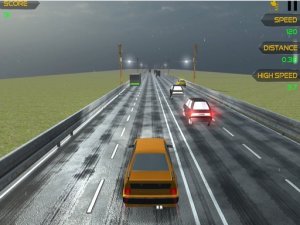
Family Racing Arcade Game is a driving arcade game that puts you in control of a vehicle navigating through various traffic scenarios. The core concept is simple: move forward safely without causing any accidents. What makes this game unique is its challenge mode, where you must maintain a set speed to prevent a timer from expiring. This adds a layer of tension without any violent content. The game offers multiple modes and roads, ensuring variety in each session. Adjustable camera angles let you find the most comfortable view, making it accessible for players of all ages. Whether you have a few minutes or an hour, Family Racing provides a clean, engaging experience focused on reflexes and focus.
How to Play
Select your preferred mode and road from the main menu. Use the arrow keys or on-screen controls to steer your vehicle. Your goal is to avoid collisions with other cars while moving forward. In the challenge mode, keep an eye on the speedometer. If your speed drops below the required level, the timer expires and the game ends. You can adjust the camera angle to your liking for a better view. The game ends when you crash or fail to maintain speed in challenge mode. Practice to improve your driving skills and achieve longer runs. Each attempt helps you learn traffic patterns and timing.
Game Features
Navigate through realistic traffic scenarios in multiple modes. The challenge mode tests your ability to maintain a set speed. Adjustable camera angles let you customize your view. Multiple roads and modes provide variety. Simple controls make it easy for anyone to start playing.
Tips for Success
Practice regularly to get comfortable with the controls and learn traffic patterns. Focus on maintaining a steady speed, especially in challenge mode, to avoid the timer expiring. Adjust the camera angle to find a view that helps you see obstacles ahead. Stay calm and avoid sudden movements to reduce the risk of collisions. Over time, you will improve your reflexes and achieve longer runs.